Introduction
POD Governance is an internal workflow platform for managing delivery cycles, priorities & achievements (Priorities & Achievements), and team reporting. The platform implements a hierarchical approval chain: Project Lead → Project Manager → Delivery SPOC → Sales SPOC → POD Owner → Cluster Head. For Priorities & Achievements only, an optional Project Contributor tier sits below the Project Lead (Project Contributor → Project Lead → …); contributors are not shown in reports, Ups & Downs, or project membership.
App Shell
Every authenticated screen uses a unified left sidebar (dark navy, role-based navigation) plus a topbar with user avatar and notification bell. The shell is defined in AppShell.tsx.
Routing
Single-page application using React Router v6. Protected routes enforce authentication and role-based access. Admin routes additionally require the admin role.
Notifications
Email notifications use about seventy editable ET- templates, listed in Admin → Email (codes run from ET-001 to ET-080 with gaps; the sign-in email is built in and is not a template). In-app notification bell in topbar shows unread count with live polling. Clicking a notification navigates to the relevant screen.
Automation
Scheduler service runs 9 registered cron jobs (week kickoffs, reminders, digests, escalations, scheduled reports, Priorities & Achievements all-roles). Admins can inspect run history and trigger jobs manually.
Tech Stack
Frontend
- React 18 + TypeScript
- Vite build
- React Router v6
- Axios (API calls)
- Recharts (charts in reports)
Backend
- Node.js + Express
- Prisma ORM
- PostgreSQL database
- JWT authentication
- node-cron scheduler
Key Services
- Notification service (email templates)
- Scheduler service (every cron job is listed on Admin → Scheduler)
- MCP server (stdio adapter) — 121 tools / 3 resources / 3 pre-built prompts
- Audit log (all writes)
- Scheduler run log
File locations
src/web/src/screens/— React screenssrc/api/src/— API + servicessrc/api/prisma/— schema + migrations
Roles & Access
Role keys stored in the database and JWT claims. Every user can hold multiple roles across different projects.
| Role Key | Display Name | Workflow Screen | Priorities & Achievements Chain Position |
|---|---|---|---|
| project_contributor | Project Contributor | Priorities & Achievements Screen (P&A only) | Bottom tier — reports to Project Lead. Not shown in reports, Ups & Downs, or projects. |
| pl | Project Lead | Project Lead Screen | Reports to Project Manager; also reviews their Project Contributors |
| pm | Project Manager | Project Manager Screen | 2nd — reports to Delivery SPOC |
| delivery_spoc | Delivery SPOC | Delivery SPOC Screen | 3rd — reports to Sales SPOC |
| sales_spoc | Sales SPOC | Sales SPOC Screen | 4th — reports to POD Owner |
| pod_owner | POD Owner | POD Owner Screen | 5th — reports to Cluster Head |
| cluster_head | Cluster Head | Cluster Head Screen | 6th — top of chain |
| pmo | PMO | PMO Screen | Observer/coordinator |
| admin | Administrator | Admin Portal | Full access to all admin screens |
Authentication

Login Screen
/login- Passwordless: enter your
@valuelabs.comaddress and the server emails a sign-in link and a 6-digit code (a built-in email, not an editable template) - Type the code on the same page, or click the link in the email; either signs you in for 7 days
- An address that is not registered can ask for an account; an expired or pending invitation says so
- Returns you to the page you first asked for, or
/dashboard - Dev and staging only: one-click demo tiles grouped by role

Email Verify Screen
/auth/verify- Where the link in the sign-in email lands; it checks the link and signs you in
- On success: opens the dashboard (the session is a secure cookie)
- An invalid, expired or already-used link shows a clear message with a way back to Sign in
- The 6-digit code from the same email is typed on the Login page, not here
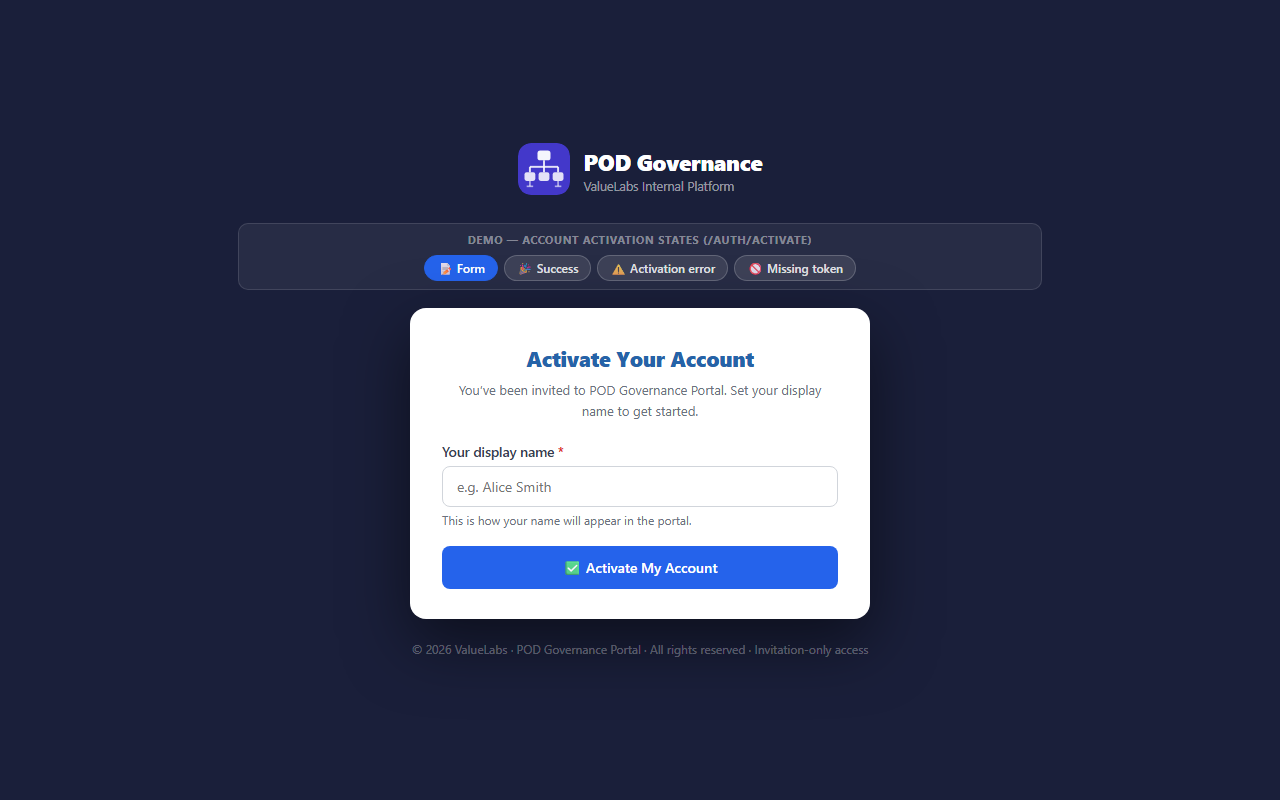
Activate Account Screen
/auth/activate- Opened from the invitation email link (ET-013 Portal Invitation; ET-014 is its reminder)
- Asks only for your display name; there is no password to set
- On submit: activates the account and signs you in
- An invalid, expired or already-used invitation shows an error card
Email Preferences
(no screenshot yet)
Email Preferences
/email-preferences- Opened from the links at the foot of every notification email; works for that email address only, without signing in
- Stop these emails, Stop all notification emails, or a pause for 1 day, 1 week or 30 days
- The same per-category switches and digest frequency as My Profile; nothing changes until you click
- Sign-in, invitation and account emails always arrive; an expired or invalid link says so
Navigation

Module Picker (Dashboard)
/dashboard- Landing page after login — shows role-relevant module tiles
- Tiles rendered based on the user's roles (Workflow, Priorities & Achievements, Reports, Admin, Cycles)
- Recent activity feed showing latest workflow events
- Quick-access KPI cards: open submissions, pending reviews, overdue items
- Notification bell with live unread count
- Sidebar navigation always visible for direct module access
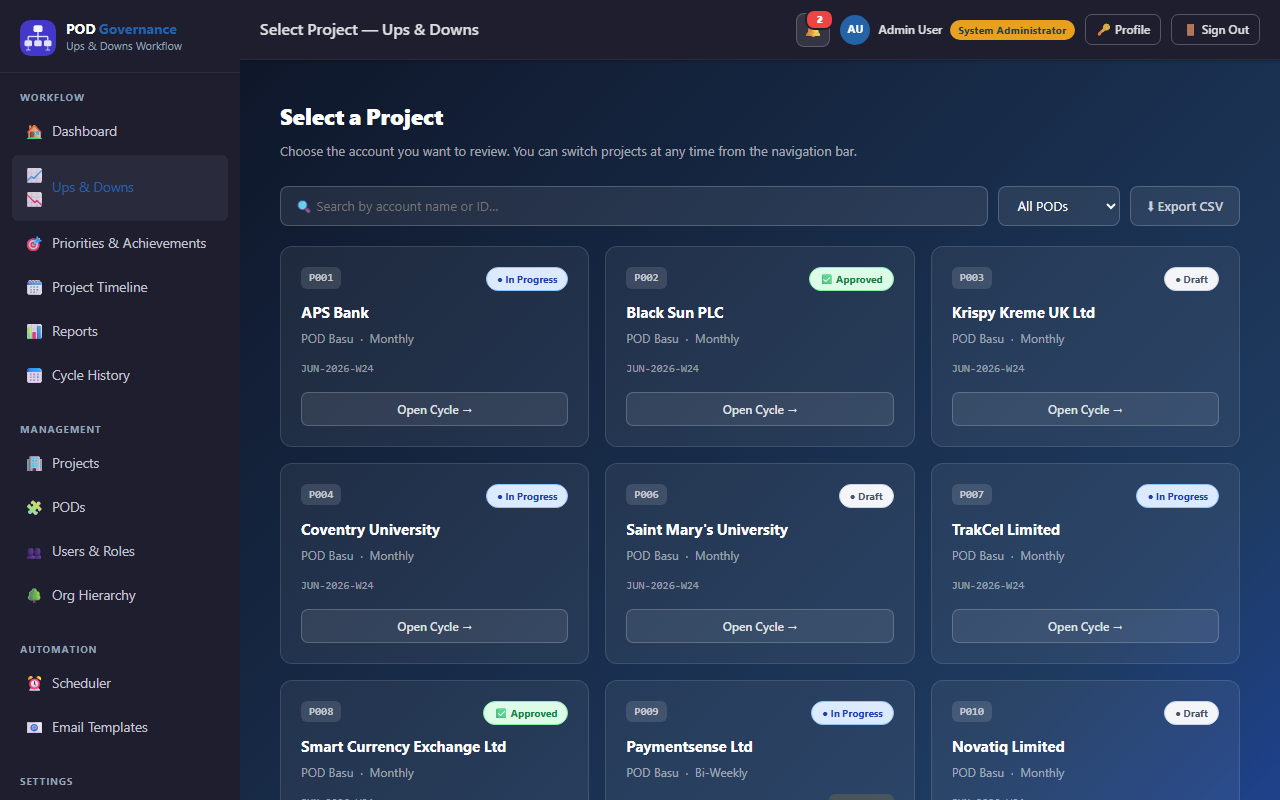
Projects Screen
/projects- Searchable, filterable list of all projects the user is associated with
- Columns: project name, POD, status (active / inactive), assigned roles
- Clicking a project navigates to the relevant workflow screen for that project
- Status badges colour-coded (green = active, amber = pending, blue = on-hold)
- Admin users see all projects; regular users see only their assigned projects
Workflow Screens
Each role in the delivery chain has a dedicated workflow screen. Screens share a common pattern: a header with cycle info, a KPI strip, a submission area, and a team-status table showing the people you review on that project.
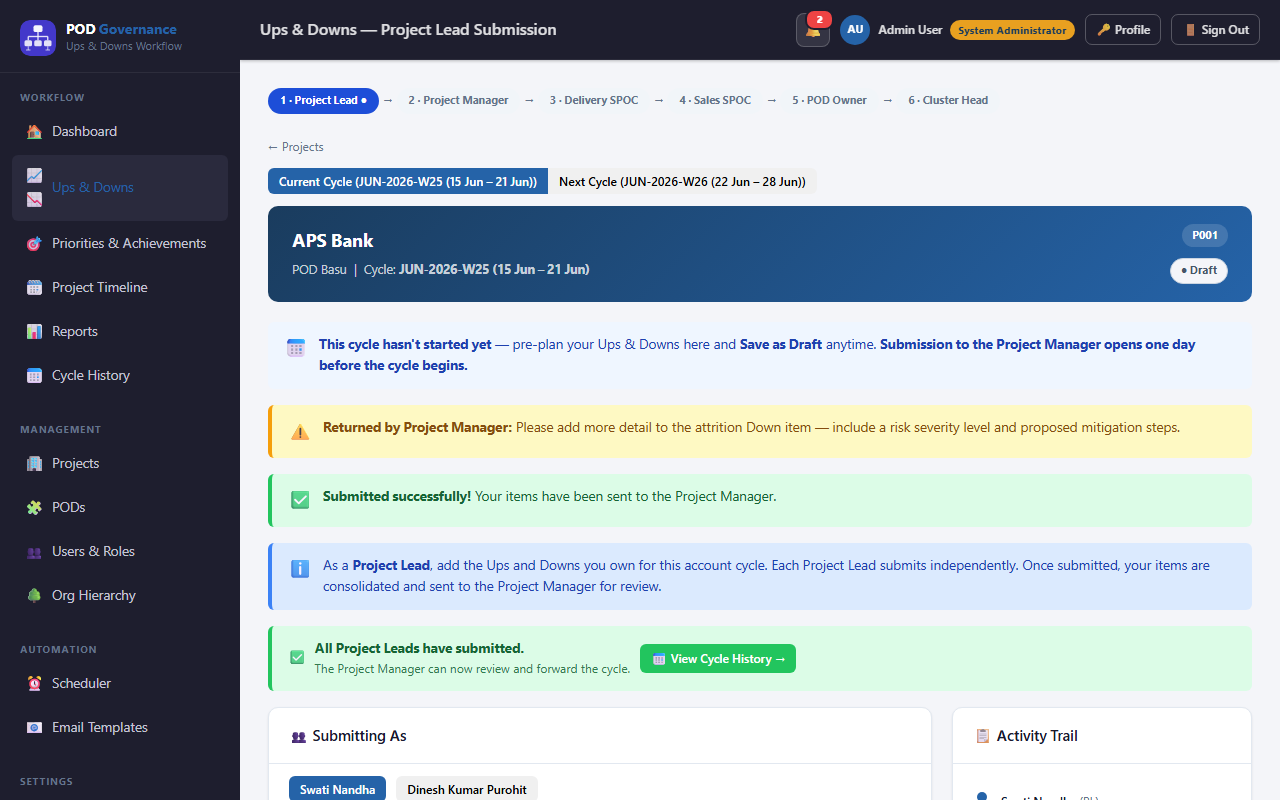
Project Lead Screen
/workflow/pl- Week KPI strip: current week ID, submission deadline countdown
- Priorities text area — submit weekly priorities for the active cycle
- Achievements text area — submit achievements from last week
- Highlights / Lowlights free-text fields
- Submit / Save Draft buttons; submitted state locks the form
- Current Cycle / Next Cycle tabs — pre-plan the upcoming iteration's Ups & Downs as they happen; the next cycle is created (draft) on demand per the project cadence (weekly / biweekly / monthly)
- Next-cycle submission window — Save as Draft anytime, but Submit to the Project Manager opens once the cycle is created and announced (14 days before its end date), or one day before the cycle begins if it was only pre-planned
- View submission history via link to cycle history
- Automated ET-007 kickoff email triggers on Monday morning
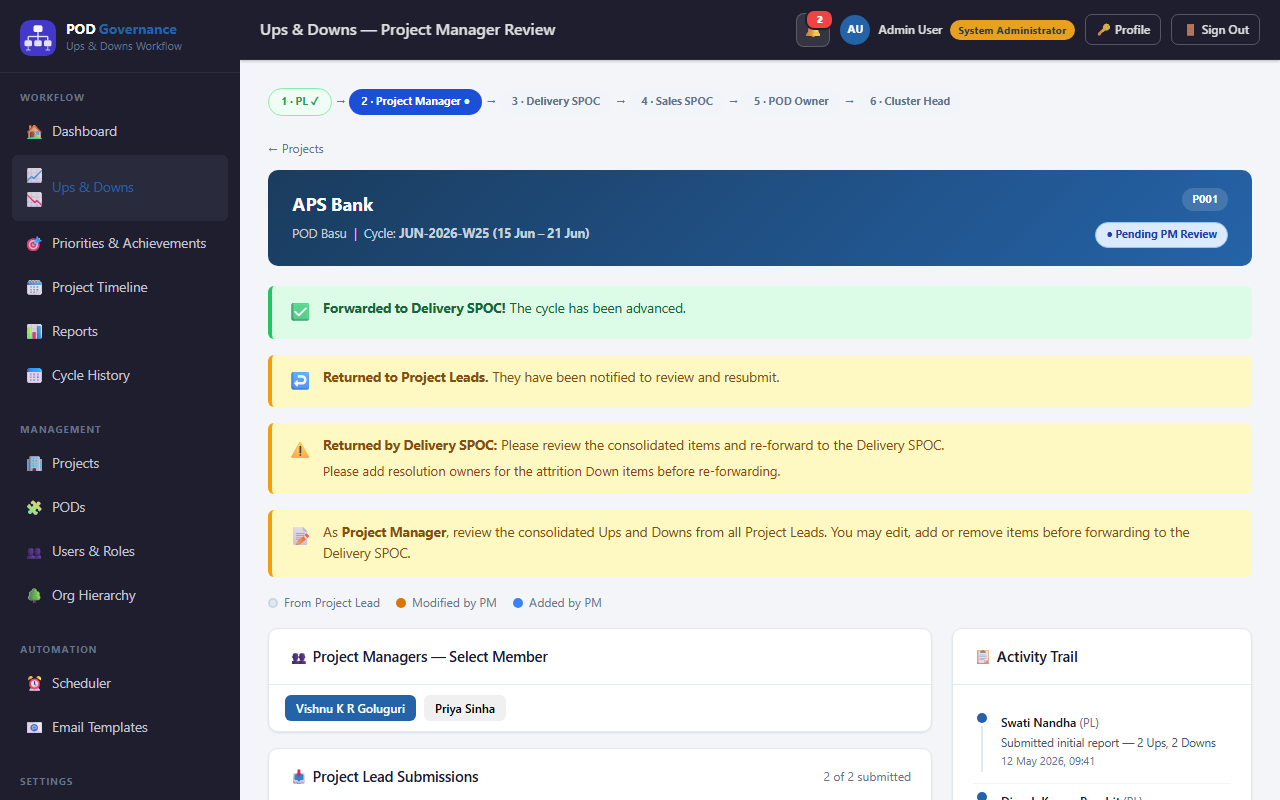
Project Manager Screen
/workflow/pm- KPI strip: total Project Leads assigned, count submitted, count missing
- Project Lead submissions table — view each Project Lead's priorities and achievements
- Review each submission inline: approve, return with comment, or escalate
- Own submission area for Project Manager's weekly Priorities & Achievements to Delivery SPOC
- Missing submission follow-up action triggers ET-008 reminder email
- Submission deadline indicator with colour change when overdue

Delivery SPOC Screen
/workflow/delivery-spoc- Aggregated view of all Project Manager rollup submissions
- KPI strip: Project Manager count, reviewed vs pending
- Expand each Project Manager row to see the full rollup detail
- Add commentary and approve the Project Manager aggregation
- Submit own rollup upward to Sales SPOC
- ET-007 Priorities & Achievements kickoff can be sent via pa_kickoff_all scheduler job
Sales SPOC Screen
/workflow/sales-spoc- Receives Delivery SPOC rollups for the projects where they hold the Sales SPOC seat
- Review and approve each Delivery SPOC submission with comments
- Consolidated summary view of delivery performance across SPOCs
- Submit own synthesis upward to POD Owner
- Deadline tracking and escalation path

POD Owner Screen
/workflow/pod- Rollup view from all Sales SPOCs within the POD
- Progress stepper showing chain completion stage by stage
- Detailed view of each SPOC's submission with diff from previous week
- POD-level commentary and approval before sending to Cluster Head
- Escalation alerts for overdue SPOC submissions
- Submit POD summary upward to Cluster Head

Cluster Head Screen
/workflow/cluster-head- Final stage of the delivery chain — receives POD Owner summaries
- KPI strip: POD count, all-submitted indicator, total project count
- Expand each POD row to read the full rollup with nested chain detail
- Approve, return with comment, or acknowledge each POD summary
- Priorities & Achievements Acknowledge button for Priorities & Achievements digest acknowledgement (Sprint 12)
- Weekly Priorities & Achievements digest email (ET-022) sent automatically by the scheduler
- Full cycle is complete when all POD summaries are acknowledged

PMO Screen
/workflow/pmo- Cross-cluster observer view — read-only access to all POD summaries
- Tabbed view: All Projects / By POD / By Status
- KPI strip: total projects, on-track count, at-risk count
- Drill down into any project to read submission history
- Export capability for offline reporting (CSV)
- No approval actions — PMO is observational, not in the approval chain
Review Cycles

Cycle History Screen
/cycles/history- Paginated list of all review cycles (past + current + upcoming)
- Columns: cycle name, ISO week, status, next scheduled run, completion %
- Status badges: Active / Complete / Pending / Upcoming
- Click any cycle row to navigate to cycle detail
- Filter by status, date range, or search by cycle name
- Admin users can see the full run log for each cycle

Cycle Detail Screen
/cycles/:id- Full detail for a single review cycle identified by ID
- KPI cards: overall completion %, submission counts, pending counts
- Chain progress stepper: Project Lead → Project Manager → Delivery SPOC → Sales SPOC → POD Owner → Cluster Head
- Per-stage completion breakdown with links to individual submissions
- Timeline of scheduler events that fired during the cycle
- Export cycle data as CSV for offline analysis
Priorities & Achievements

Priorities & Achievements Screen
/pa- Two-panel layout: submission form (left) + team submission status (right sidebar)
- Submit priorities for the current ISO week and achievements from last week
- Free-text areas for Highlights and Lowlights (optional)
- Save Draft preserves unsaved changes; Submit locks the form
- Current Week / Next Week tabs — pre-plan next week's priorities & achievements as a draft anytime; Submit to the manager is disabled until one day before the week begins
- Team Status sidebar shows the submission state of the people whose P&A you review (green/amber/red) — from Project Mapping, not a reporting line (#2437)
- My Contributors card (for Project Leads): lists Project Contributors reporting to this PL with a Review → link into the bilateral review screen
- Project Contributors land here as a P&A-only home — Ups & Downs / Cycle History are hidden for them
- Triggered via ET-007 kickoff email (both manual pa_kickoff_all and automated Monday cron)
- Supports combined week submissions (e.g. "2026-W22 & 2026-W23") from pa_kickoff_all
- Auto-approval (#3988, #4311): when nobody at the first review step (any role since #5402) approves or returns the week 36 h after the latest submit, an hourly job approves it and it shows as 🤖 Auto-approved — locked like an approval (#4034). Never when nobody active holds the first step; a resubmission restarts the clock
- While a submission waits, a note beside the locked Submit button says when it will be auto-approved; nothing is shown when it never will be (#4076)
Project Contributor Submission
/pa- P&A-only role at the bottom of the bilateral chain — a Project Contributor reports to a Project Lead (e.g. Gopal Krishna Tripathi & Shivsagar Mishra → Kuntal Singha, Black Sun)
- Uses the same Priorities & Achievements submission screen as everyone else; their submission is reviewed bilaterally by their Project Lead
- After the PL approves, the entry flows up the normal hierarchy: Project Contributor → PL → PM → Delivery SPOC → POD Owner → Cluster Head
- Excluded from reports, dashboards, Ups & Downs, and project membership — visible only within the P&A workflow
- Assigned in Admin → People & Organisation → People & Roles; the review chain comes from the project or POD each item is tagged to

Project Manager Bilateral Review Screen
/pa/bilateral-review- Each reviewer reviews a team member's Priorities & Achievements submission in a bilateral context — the chain follows the project or POD each item is tagged to: a Project Lead reviews their Project Contributors, a PM reviews their PLs, and so on up the chain
- Side-by-side view: the team member's submission vs. the reviewer's own this-week priorities
- Tabbed view per team member — navigate between everyone whose P&A you review
- Approve, return with comment, or escalate each Priorities & Achievements entry
- Project Manager adds bilateral review note that becomes part of the audit trail
- An approved review sends the Project Lead ET-011 (Priorities & Achievements Bilateral Approved)
- A pending review shows under the feedback box when the system will auto-approve it if the reviewer does not act (#4077); an auto-approved week is read-only except for Return, which the reviewer it stood in for can still use (#4051), and ET-066 / ET-067 tell the submitter and each silent PM

Cluster Head Priorities & Achievements Digest Screen
/pa/digest- Aggregated Priorities & Achievements digest for the Cluster Head — all PODs in scope
- KPI strip: total PODs, submission rate %, current week
- Grouped by POD — click to expand full team Priorities & Achievements list
- Highlights reel: top priorities and achievements across cluster
- Priorities & Achievements Acknowledge button — marks the digest as reviewed (Sprint 12)
- Weekly digest is emailed automatically as ET-022 (the scheduler job is keyed ET-011, on purpose)

Historical Priorities & Achievements Screen
/pa/history- Archive of all past Priorities & Achievements submissions by the current user
- Tabs: My Submissions / Team Submissions (if manager role)
- Filter chips: by week, by submission status, by type
- Click any row to expand and read the full entry
- Export selected entries as CSV or PDF
- Reviewers see the historical entries of the people whose P&A they review under the Team tab
Reports
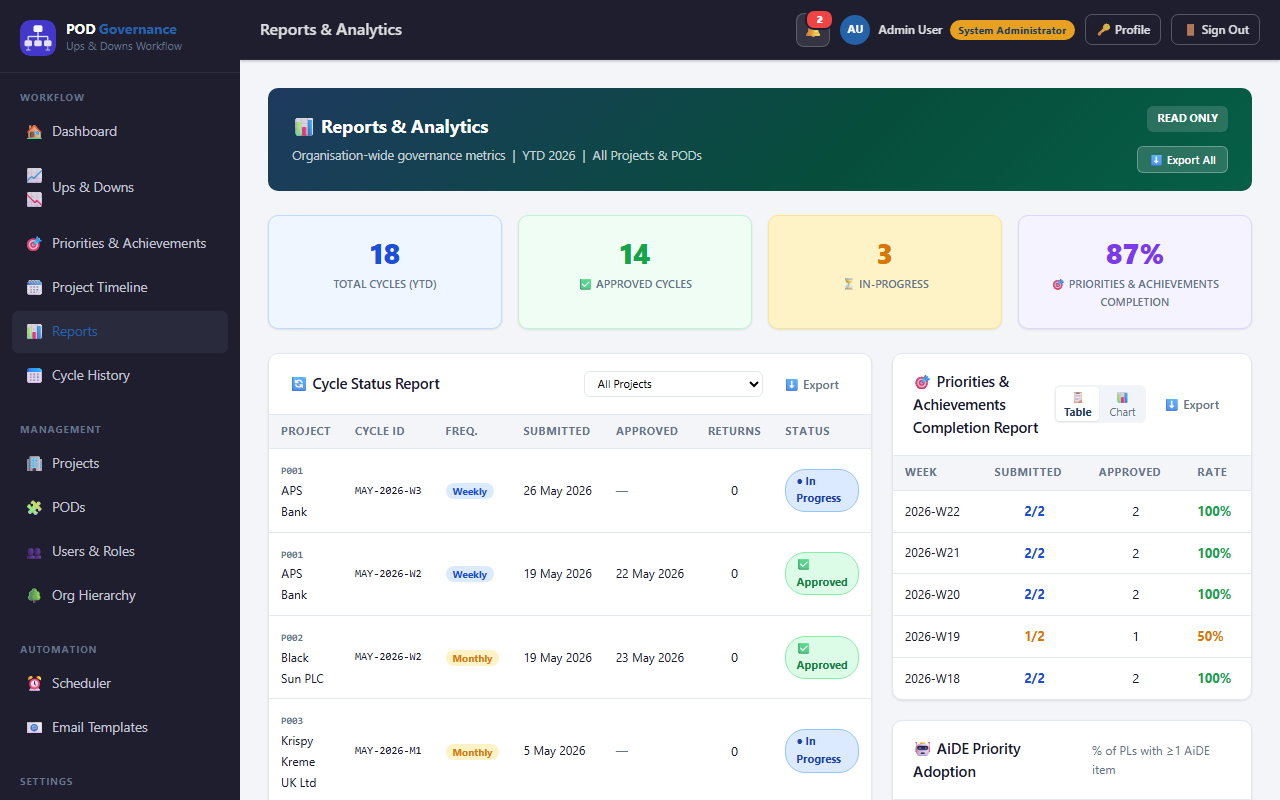
Reports Screen
/reports- Ups & Downs Trend: SVG bar chart showing weekly ups vs downs counts over time
- Priorities & Achievements Completion Rate: SVG line chart — % of team submitting Priorities & Achievements per week
- Return Rate by Stage: Horizontal bar chart — % of submissions returned at each chain stage
- Approval SLA Metrics: Card showing average time-to-approve at each stage
- ViewToggle component switches between table view and chart view for each dataset
- On-demand CSV export for all chart data sets
- Admin users additionally see User Activity report and Return Rate exports (FEAT-10B)
- Scheduled report delivery via email (FEAT-10A) — admins configure cadence in Admin → Reports
Health
(no screenshot yet)
Health
/health- AiDE-written account summary compiled from Project Timeline events, Meeting Notes AI outcomes and Priorities & Achievements — nothing invented from outside the record
- One screen, three scopes: Project (one project, week or month), POD (every project in a POD — formerly POD Health, #2206) and My portfolio (every project you are responsible for — formerly Portfolio Health, #2220).
/project-healthand/pod-healthredirect here (#2221) - A scope you cannot use is not shown at all; it opens on My portfolio if you have one, otherwise POD, otherwise Project
- Executive summary, highlights, risks, and a health score with AiDE’s rationale; Copy, Email, PDF, and scheduled weekly or monthly delivery
- Needs a connected AiDE Fabric Token
Actions
My Work
(no screenshot yet)
My Work
/my-work- Everything waiting on you across every module on one page: cycles to review, submissions due, returned items, action items and meetings to finalise
- Tiles with counts, each list oldest first, and a jump to the screen that owns each item
- Its “immediate” count (overdue items, returned submissions, long-waiting reviews) drives the sidebar badge and the app-icon badge
My Action Items
(no screenshot yet)
My Action Items
/my-actions- Every action item assigned to you across all meetings, plus standalone items you raise, as a List, Table, Calendar or Board
- Closing an item requires a written justification, recorded on the item and its audit row (#2380)
- Focus timer (#3416, #3754): a pomodoro panel that only runs against a chosen action item — presets 25/5, 50/10, 52/17 and 90/20, a daily goal, keys Space / R / S / Z, zen mode; settings follow the account, and it refuses to start rather than count time it cannot save
- Close several at once (#4108): Select in the List or Table view, tick open items, one justification recorded on each; a partial failure says how many closed and why
Meetings & Timeline
Meeting Notes AI
(no screenshot yet)
Meeting Notes AI
/meetings- Four tiles: Meetings visible to me, Open action items, Overdue action items, Action closure rate
- Each row shows mode, status, audience, overdue count and closure bar; list and calendar views
- New meeting creates a meeting (mode, date, time, participants, optional project or POD); recurring series with occurrences
- Needs your AiDE Fabric Token to process a meeting (Connect AiDE, or My Profile)
Meeting page
(no screenshot yet)
Meeting page
/meetings/:id- Add a transcript document, pasted text or a recording (transcribed for you), or several sources at once, then Process with AiDE
- Minutes, decisions, mindmap and action items, which the owner reviews and corrects before sharing
- 🔒 Finalise minutes locks the outcome; Reopen to change it
- Sharing the outcome drops a card on the linked project’s Timeline; All confirmed decisions lists the project’s (or POD’s) earlier decisions
Project Timeline
(no screenshot yet)
Project Timeline
/timeline- A per-project running log: post milestones, blockers and announcements, back-date them, attach files, link a meeting
- Audience is the reporting chain by default, or everyone on the project; PMO read every event
- Capture chips copy an event into an Ups & Downs or P&A draft as you post
- Edit, delete and note revisions; search from the command palette
Account

Profile Screen
/profile- Account tab: display name (editable), email, initials avatar, roles, and Download my data (your own records as a JSON file)
- Notifications tab: email per category, digests and push on this device
- AI & Integrations tab: your AiDE Fabric Token and your MCP access tokens
- MCP setup instructions for AiDE (VS Code), Claude Desktop and Claude Code CLI — the server exposes 121 tools / 3 resources / 3 pre-built prompts
- Personal Access Tokens: generate tokens prefixed
pgmcp_for MCP client auth - Token list shows name, created date, last used, expiry; rename, narrow the scope, change the expiry, rotate the secret, or revoke

Status Screen
/status- Real-time health indicators for API server, database, and scheduler service
- Service health table: each service with status badge and last-checked timestamp
- Automation enabled/disabled indicator (from SchedulerSettings)
- API version and build timestamp displayed
- Useful for support diagnostics — shows current user's JWT claims summary
Notifications
(no screenshot yet)
Notifications
/notifications- Every in-app notification, grouped by day, with category chips and Unread only
- Mark read, mark all read, and dismiss; the bell in the top bar shows the newest
- Email per category, digests and push are set on My Profile
Help
(no screenshot yet)
Help
/help- Thirteen topics, opened at the page you came from by the top bar’s Help button
- Full-text search, with the phrase marked in the opened topic
- Screenshots and short videos for the main tasks
What’s New
(no screenshot yet)
What’s New
/whats-new- A plain-language summary of recently shipped features, newest first
- A NEW badge in the sidebar until you have looked; an optional once-a-day notice, remembered on this device only
Admin Portal
All admin screens are under /admin/* and require the admin role. The admin portal is accessible via the Admin link in the sidebar (visible only to admin users).
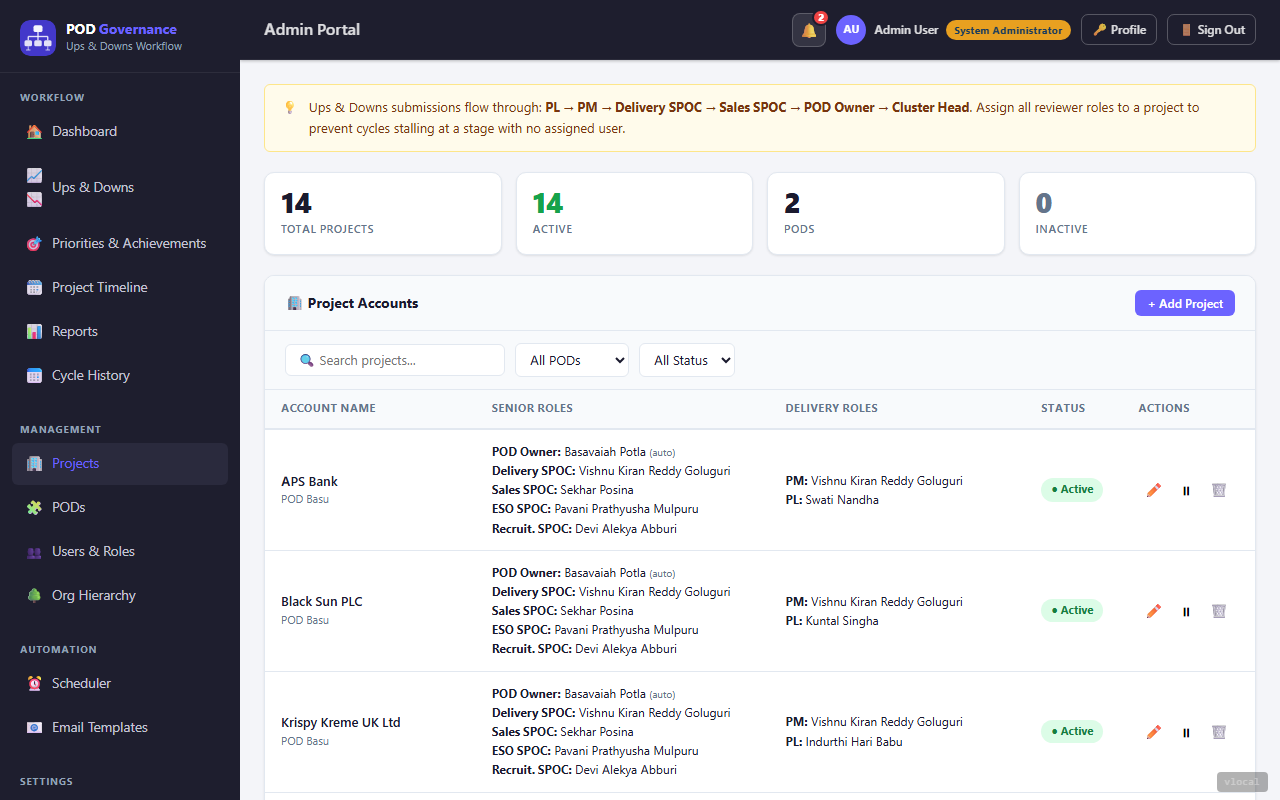
Admin — Projects
/admin/people?tab=projects- Full CRUD for projects: create, edit, deactivate
- Assign projects to PODs; set project status (active/inactive)
- Search and filter projects by name, POD, or status
- Edit modal: project name, POD assignment, role assignments (Project Lead, Project Manager, etc.)
- Shows all assigned Project Managers and Project Leads in the edit modal
- Deactivation hides the project from workflow screens without deleting data

Admin — PODs
/admin/people?tab=pods- Full CRUD for PODs (Profit Delivery Units)
- Assign POD Owner and Cluster Head to each POD
- Project count badge shows how many projects belong to each POD
- Edit modal: POD name, owner assignment, cluster head assignment
- Deactivate POD hides it from workflow without deleting history
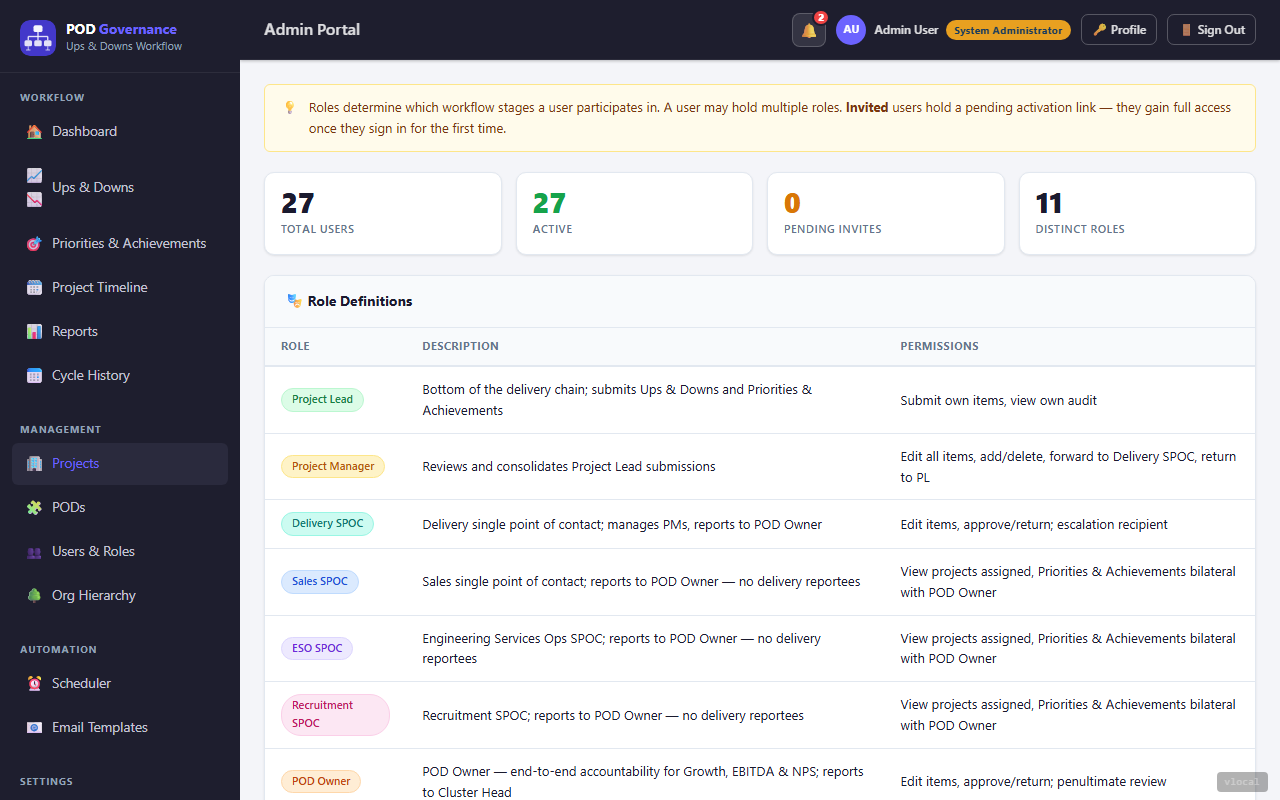
Admin — People & Roles
/admin/people- User directory with search by name or email
- Invite new user: sends the ET-013 invitation email with an activation link (ET-014 reminds them if they have not activated)
- Edit user roles (multi-select from all role types)
- Activate / deactivate user accounts
- Role badges shown inline; click to expand role + project assignments
- Resend invitation for anyone who has not signed in yet; sign-in is passwordless (an emailed link or code), so there is no password to reset
- People & Organisation hub: this tab sits beside PODs, Projects, Hierarchy, Seat Coverage and Access Requests; the old
/admin/usersaddress opens it
Admin — Hierarchy
(no screenshot yet)
Admin — Hierarchy
/admin/people?tab=org- A tree of who sits above whom, built from the role ladder (Cluster Head, POD Owner, Project Manager, Project Lead)
- Shows each person’s PODs and projects; export to CSV
- The old
/admin/org-hierarchyaddress opens this tab
Admin — Seat Coverage
(no screenshot yet)
Admin — Seat Coverage
/admin/people?tab=seats- Which senior seats are empty on each active project, worst-staffed project first
- Lets PMO find staffing gaps without database access
Admin — Access Requests
(no screenshot yet)
Admin — Access Requests
/admin/people?tab=requests- The queue of requests from people asking to join a project
- Answering records the decision and tells the requester; it does not add the membership, so map the person on People & Roles first (the row links there)

Admin — Scheduler
/admin/scheduler- Configuration tab: enable/disable all automation globally (
disableAllAutomation), per-notification toggles, manual cycle creation with project selection - Activity & Run Log tab: Upcoming Runs table + Run History table with status badges, duration, items affected, and expandable detail JSON
- Run History filters: by job type, status (success / failed / skipped), date range — Export as CSV
- Every execution is persisted to the
scheduler_runsdatabase table (jobType, status, trigger, startedAt, finishedAt, durationMs, itemsAffected, detail JSON)
| Job Type | Label | Cron / Schedule | Email Template | Description |
|---|---|---|---|---|
| cycle_creation | Cycle Creation Poll | Every minute | — | Checks active SchedulerCycle rows and auto-creates a new review cycle when the next run time is reached. Hidden from Upcoming Runs (covered by cycle table). |
| ET-007 | Priorities & Achievements Monday kickoff | Mon 02:30 UTC (08:00 IST) | ET-007 | Opens the P&A week for everyone on an active project or POD who is asked to submit P&A. States the deadline — the end of Monday in the recipient’s own timezone — and carries their P&A on-time record. |
| ET-008 | P&A submission reminder | Hourly :05; acts Mon–Thu at 07/11/15/19 and Fri at 07/11 submitter-local | ET-008 | Reminds every P&A submitter who has not submitted, until they do (POD Owners and Cluster Heads excepted). From Tuesday it says the week is overdue. Carries the recipient’s on-time record. |
| ET-012 | Missed submission escalation | Wed 06:30 UTC (12:00 IST) | ET-012 | Tells each project’s Project Managers which of its Project Leads have still not submitted this week’s P&A. |
| pa_kickoff_all | P&A end-of-week reminder | Fri 10:30 UTC (16:00 IST) | ET-040 | The last reminder of the week, to anyone asked to submit P&A who is still outstanding. Says the week was due on Monday. |
| ET-011 | Cluster Head weekly digest | Mon 12:30 UTC (18:00 IST) | ET-022 | The weekly P&A digest for Cluster Heads. The job key and the template differ on purpose: ET-011 is also the unrelated “P&A returned for revision” template. |
| ET-014 | Invitation reminders | Every 6 hours | ET-014 | Re-sends the activation link, with a fresh token, to people invited 48 hours ago who have not activated. |
| reminder_engine | Inactivity reminders | Hourly | ET-003 | Chases an Ups & Downs cycle that has gone quiet at a review step, emailing the reviewer it is waiting on (PM, then each senior step in turn). A cycle still waiting on its leads is left to the daily due reminder (ET-065), which also carries each lead’s on-time record. |
| run_scheduled_reports | Scheduled Report Delivery | Daily 06:00 UTC | — | Delivers reports configured in Admin → Reports. Checks each ScheduledReport row for due deliveries, generates the report data, attaches CSV, and emails to recipients. |
| pa_kickoff_all | P&A end-of-week reminder (ET-040) — people asked to submit, not yet submitted | Fri 10:30 UTC (16:00 IST); also ▶ Run Now | ET-040 | Sends ET-040 to everyone on an active project or POD who is asked to submit P&A and has not yet submitted this week. One email per recipient per week. API: POST /api/v1/admin/scheduler/jobs/pa_kickoff_all/fire |
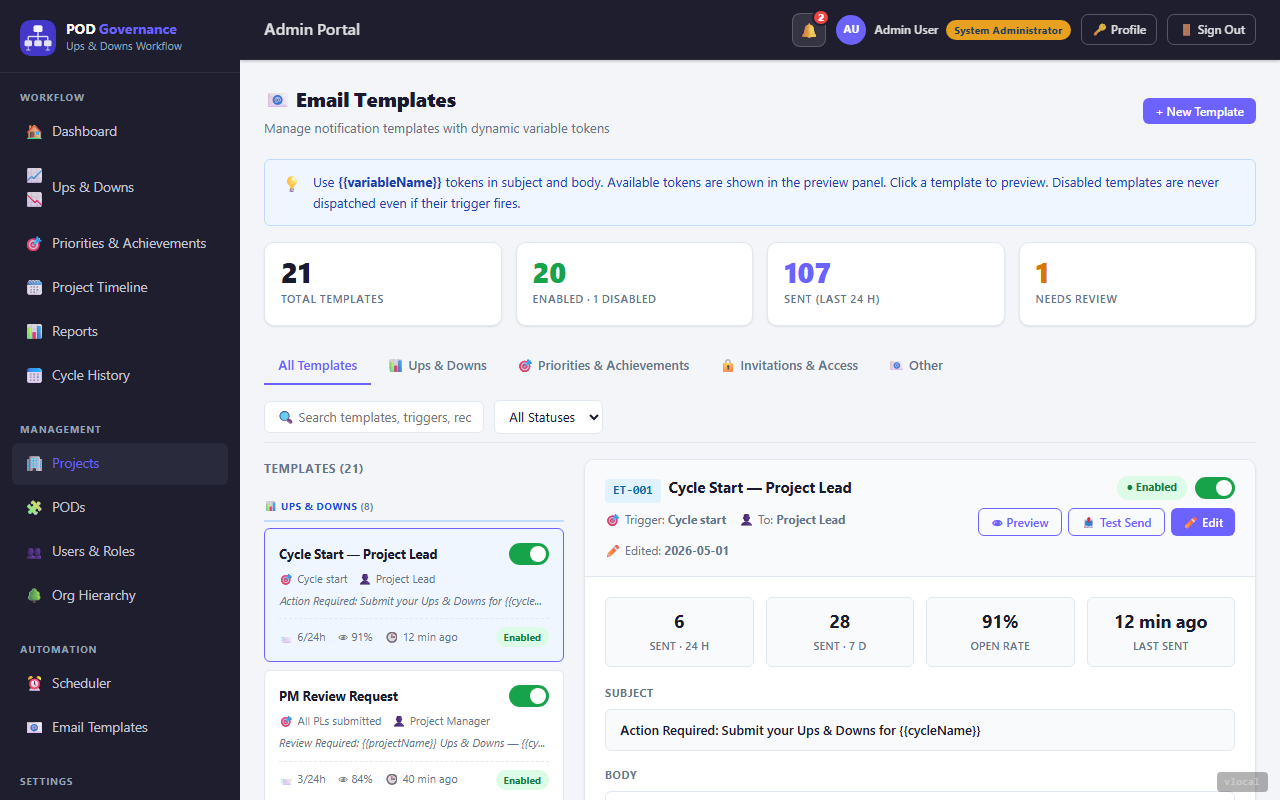
Admin — Email Templates
/admin/email- Templates tab of the Email hub: view and edit every ET- notification template (the old
/admin/email-templatesaddress opens it) - Edit subject line and HTML body with live token preview
- Supported tokens:
{{userName}},{{projectName}},{{weekLabel}},{{deadline}},{{managerName}},{{submissionLink}}and more - Test-send any template to a specified email address
- Change history per template (audit trail)
- Reset to default option available for each template
Admin — Email Delivery Log
(no screenshot yet)
Admin — Email Delivery Log
/admin/email?tab=log- Every email the system has sent: recipient, subject, template, kind, delivery status and time
- Opens the final message as it was sent, in a safe preview
- Search and filter by status, kind, template and date range; export to CSV
- The old
/admin/email-logaddress opens this tab

Admin — Reports
/admin/reports- One page, Reports & Exports: pick a From and To date, then download any of six reports as CSV
- Cycle Status, Ups & Downs Trend, Priorities & Achievements Completion, User Activity, Return Rate (by stage, reason and reviewer), and the Full Audit Log
- Scheduled reports: name, report type, recipients, weekly (a weekday) or monthly (a day of the month), and a time
- Each schedule can be sent now (the schedule is unchanged), paused or resumed, edited or deleted

Admin — MCP Tokens
/admin/mcp- Admin view of all Personal Access Tokens (PATs) issued across all users
- PAT prefix:
pgmcp_— used for MCP server authentication - Columns: user, token name, created date, last used, expiry
- Admin can revoke any token (e.g. for offboarding or security incidents)
- Search by user or token name
- Users manage their own tokens in Profile → MCP Guide tab

Admin — MCP Interaction Log
/admin/mcp?tab=log- Audit log of all MCP tool calls made via the MCP server (FEAT-09C)
- Columns: timestamp, user (token owner), tool called, request summary, status
- Filter by user or tool name; paginated results
- Failed calls shown with error detail on expand
- Useful for auditing AI-assisted access to POD Governance data via Claude/MCP clients
- Export as CSV for compliance reporting
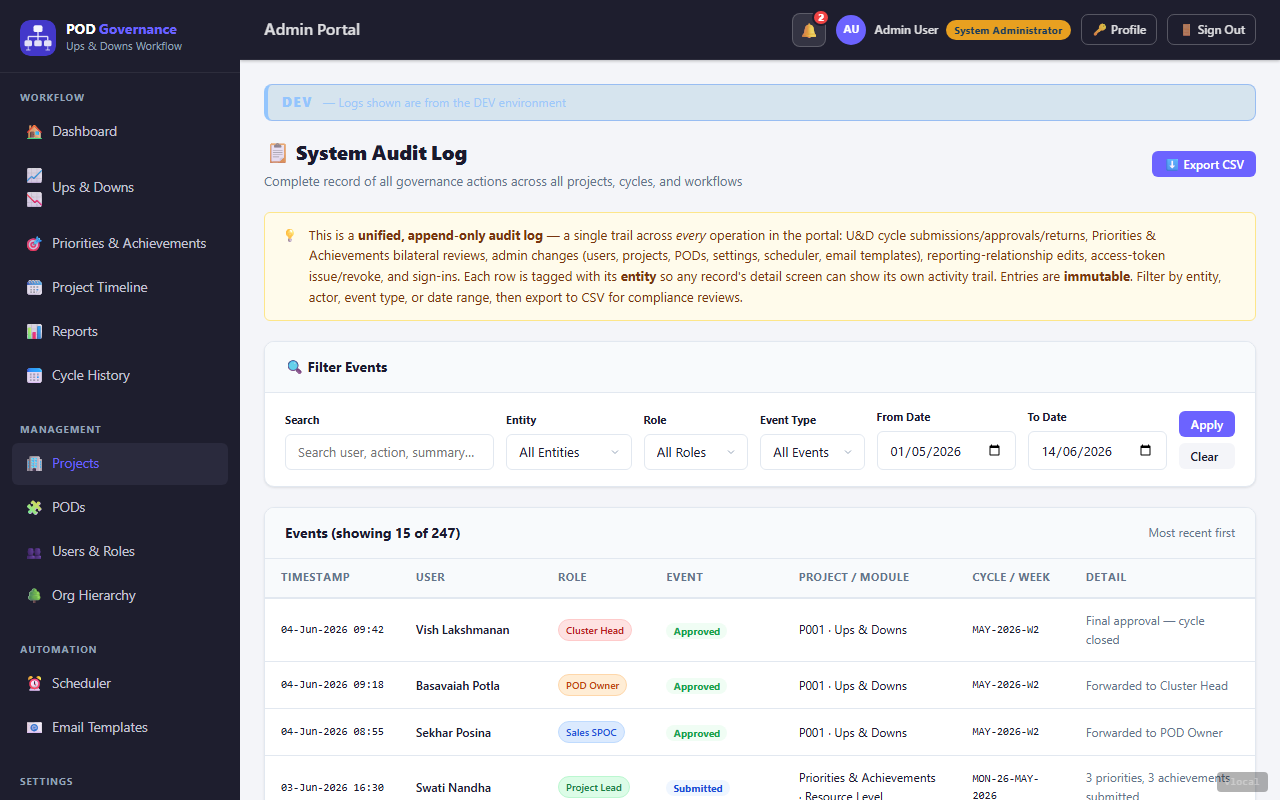
Admin — Audit Log
/admin/audit-log- One append-only log of every operation: Ups & Downs cycles, Priorities & Achievements reviews, and admin changes to users, projects, PODs, settings, the scheduler, templates, access tokens and sign-ins
- Each row names who did it (the automated system has its own pill), the event and the record it touched
- Search by user, action or project; filter by entity, role, event and date range; choose the page size
- Expand a row to see what changed
- Export filtered results as CSV for compliance and OWASP audit requirements
- Sanitised log output — PII is masked in exported fields (OWASP QA fix)
Admin — Telemetry
(no screenshot yet)
Admin — Telemetry
/admin/telemetry- How fast, how often, and what went wrong — measured from real requests (#3561)
- A time window drives the page: Slowest operations ranked by 95th percentile (with median and call count), Errors with per-failure trace links, Traffic volume by service
- Look up a single trace by its identifier to follow one request end to end
- Request-level timings unless database tracing is switched on; an empty window is usually a collection or retention setting, not a fault
Admin — AiDE
(no screenshot yet)
Admin — AiDE
/admin/aide- Config tab: the model, endpoint and timeouts AiDE runs with, read-only on purpose (fixed per deployment), plus usage by run type with median / p95 / slowest durations
- Runs tab (#2411): every AiDE run not attached to a meeting — filter by type, outcome or the person who triggered it; export to CSV
- Meeting runs are listed on their own meeting, not here
Admin — Meetings register
(no screenshot yet)
Admin — Meetings register
/admin/meetings- Every meeting in the organisation, with AiDE processing state and action-item closure
- Shows counts only, never transcripts or minutes
- Filters, and export to CSV that keeps them
- 🔔 Nudge emails the owner about each overdue action item
Admin — Webhooks
(no screenshot yet)
Admin — Webhooks
/admin/webhooks- Send chosen POD Governance events to an outside web address
- The signing secret is shown once, when the webhook is created
- Send a test ping, edit the events, or revoke
- A log of recent delivery attempts, newest first
Admin — Settings
(no screenshot yet)
Admin — Settings
/admin/settings- System Admin only: a read-only view of the live configuration; secrets show only as set or not set
- A live test of the email (SMTP) connection
- Attachment storage settings
POD Governance Implementation Documentation · updated 08 Oct 2026 · Mockup reference (PAGES.md)